Market Adapter
Market adapters function as the first step of two steps for getting data into the Energyworx Platform. This is accomplished by reading the data of the file it is subjected to and creating an output that can be interpreted by the Platform in Python to achieve the ultimate goal of bringing data into the system.
The Market Adapter configuration allows the user to upload a Python code that will be executed in runtime to perform all the normalizing data processes. However, the platform also provides some generic Market Adapters that can be used to read more common file types, such as:
| file type | technical name |
|---|---|
| CSV | csv |
| Excel | excel |
| JSON/JSONP | json_market_adapter |
| XML | xml |
The configuration name of the Market Adapter should be unique, but you can use the above base Market Adapters in as many configurations as you may see fit.
Market Adapter configuration
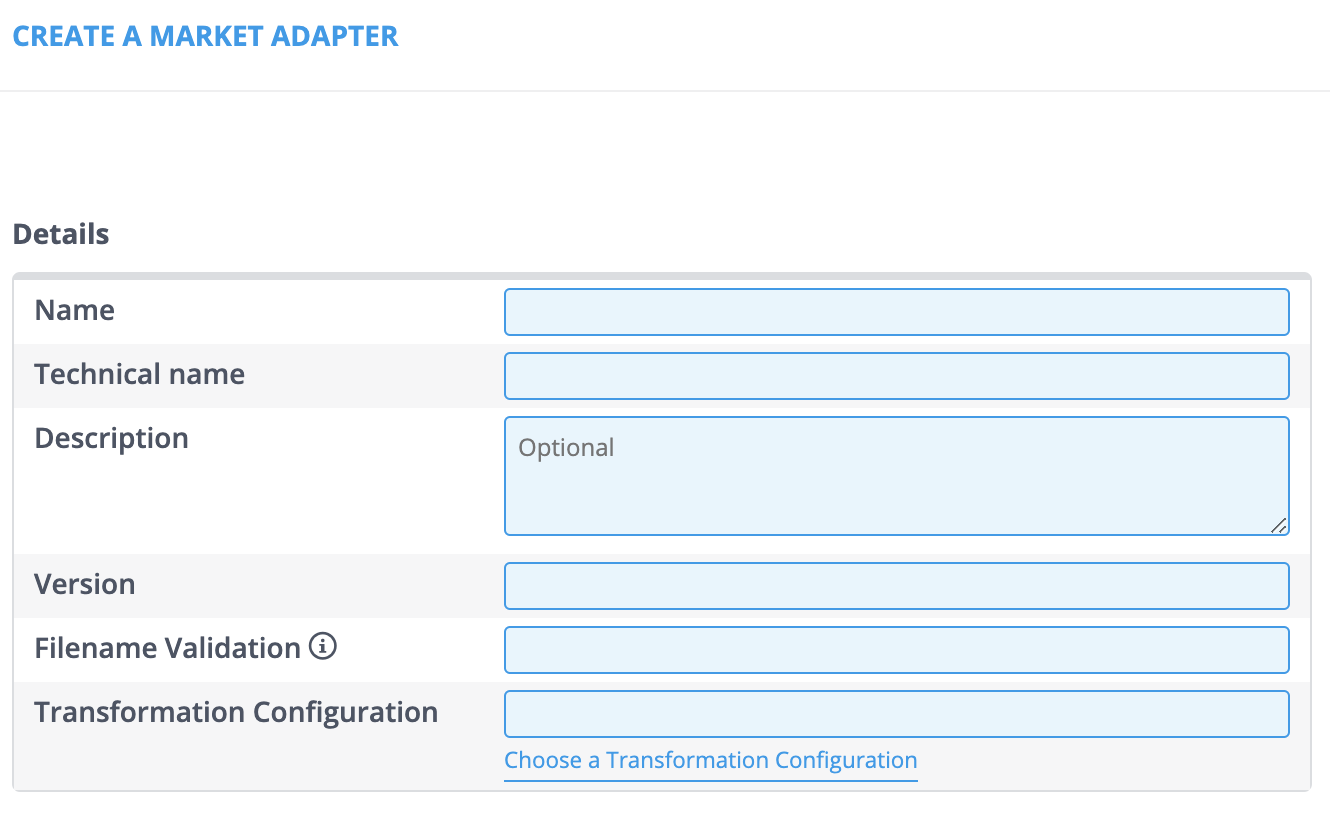
Market Adapter management can be found at [Smart Integration -> Market Adapters]. Go through the following steps in order to create, edit or copy a Market Adapter. For creating a new Market Adapter, the menu will look as follows.
- Click the [Create] button.
- Fill in the Name, Technical name, and Version fields (The Description field is optional).
- Note: The Technical name needs to match the Market Adapters file name in the code. The Version needs to match the Market Adapters class name in the code, which is either V1 or V2 in a lot of cases.
- Click the [Choose a Transformation Configuration] hyperlink to assign a Transformation Configuration. A new window will open.
- Use the Search field to narrow down your search if necessary and click [Select].
- Note: Only the properties that are available in the Market Adapters code can be added.
- Click the [+ Add] button in the Properties section.
- Fill in the Keys and Values fields.
- Click [Save] when you’re done.
In addition to all the fields you previously filled in, the Market Adapter is also given a unique ID.
When you need to edit an already existing Market Adapter, go to the Market Adapter overview. This will look as follows.
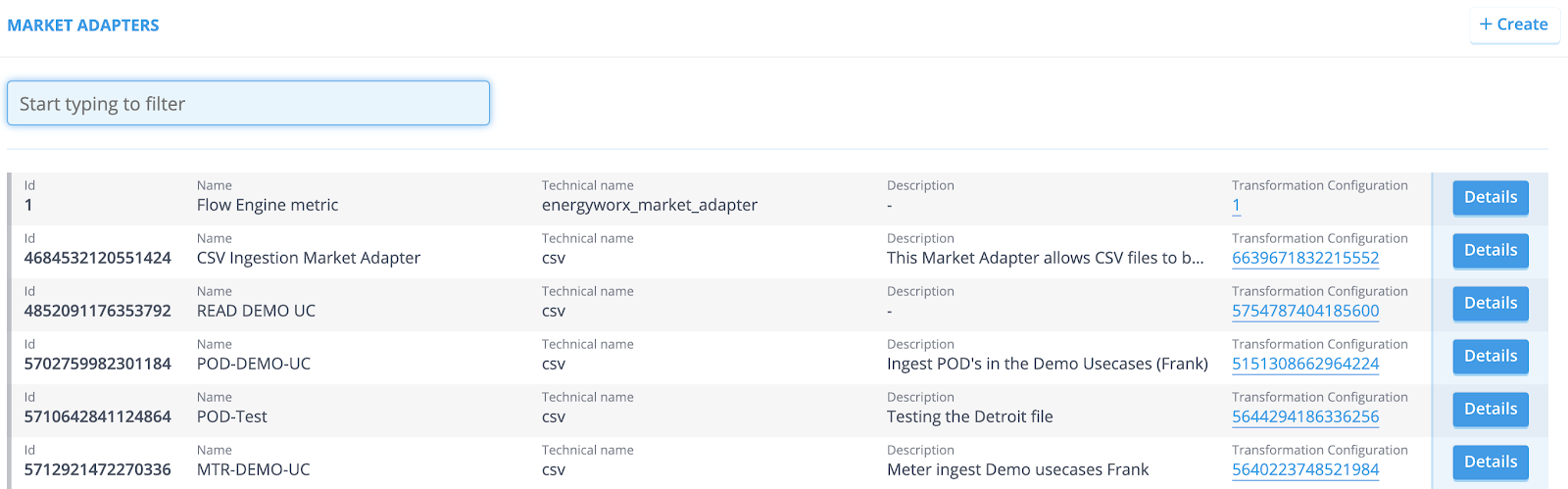
- Click the [Details] button. You are now redirected to the Market Adapter page.
- Click the [Edit] button.
- Make your desired changes and click [Save] when you’re done.
In some cases it can be useful to copy an already existing Market Adapter and make the necessary changes from there on.
- Go to the overview and click the [Details] button of the Market Adapter you want to copy.
- Simply click [Copy]. You are now redirected to the Market Adapter page. All the available fields are already filled in.
- Make your desired changes and click [Save] when you’re done.
Implementation
In addition to the provided basic Market Adapters customers can also implement their own Market Adapter in python code. You can see how to write code for Market Adapter in How to write a Market Adapter
Automated MA Assignment
The platform can automatically assign a Market Adapter (MA) to incoming files as soon as they land in cloud storage. This feature enables fully automated, hands-free data ingestion based on the file's payload type.
Configuration
Automated MA assignment is configured per namespace using the namespace propertymarket_adapters. This can be set by going to Admininstrator > Namespaces > Details (of a specific namespace)
The namespace property can only be set by platform admins (until 25.04 version, only available to energyworx accounts, must be requested via service desk) The property define which market adapter to use for a given payload, the format is as follows:
{
"Payload1": 6419342926311424,
"Payload2": 9876543210123456,
"Payload3": MA_id,
}
🔒 Platform Restrictions Setting the namespace properties can only be done by Platform Administrators.
Availability Note: Prior to version 25.04, this feature was exclusively available to Energyworx accounts and required a request via the service desk. This restriction has been lifted starting from 25.04
Generic Market Adapter Properties
Each generic Market Adapter accepts a set of properties that can be configured in the Properties section of the Market Adapter configuration. The available properties depend on the technical name and version selected.
CSV (csv)
Version V1
| Property | Type | Default | Description |
|---|---|---|---|
split_lines | int | 10000000 | Maximum number of data rows per chunk. Only used when no datasource splitting is configured. |
separator | str | auto-detected | Column delimiter character (e.g. ,, ;, \t, |, ~). Required when datasource_id_columns or datasource_id_columns_indices is set. |
datasource_id_columns | str | — | Comma-separated column name(s) that together form the datasource ID. Use when the file has headers and contains data for multiple datasources. Cannot be combined with datasource_id_columns_indices. |
datasource_id_columns_indices | str | — | Comma-separated zero-based column indices that form the datasource ID. Use when the file has no headers. Cannot be combined with datasource_id_columns. |
has_header | True/False | True | Whether the file contains a header row. Must be False when using datasource_id_columns_indices. |
index_columns | str | — | Comma-separated column names to use as index columns. |
channels_column | str | — | Name of the column containing channel names in a long-format CSV (one row per channel reading). Requires datasource_id_columns. |
Version V2
V2 reads the file via pandas.read_csv and supports transformation steps. All properties are passed directly to pandas.
| Property | Type | Default | Description |
|---|---|---|---|
filename_regex | str | — | Regular expression the incoming filename must match. Files that do not match are rejected with an error. |
steps | str | — | Comma-separated list of post-read transformation steps to apply to the DataFrame. Supported values: melt, groupby, transpose. |
sep | str | , | Column separator. |
delimiter | str | — | Alias for sep. |
header | int or str | infer | Row number(s) to use as column names. |
names | str | — | Comma-separated list of column names to assign (must match the number of columns in the file). |
index_col | str | — | Comma-separated column index/name(s) to use as the row index. |
usecols | str | — | Subset of columns to read. |
dtype | str | — | Data type for all or specific columns. |
engine | str | — | Parser engine (c, python). |
true_values | str | — | Comma-separated values to interpret as True. |
false_values | str | — | Comma-separated values to interpret as False. |
skipinitialspace | True/False | False | Skip whitespace after the delimiter. |
skiprows | str | — | Comma-separated row indices to skip. |
skipfooter | int | 0 | Number of rows to skip at the end of the file. |
nrows | int | — | Maximum number of rows to read. |
na_values | str | — | Comma-separated additional strings to treat as NaN. |
keep_default_na | True/False | True | Whether to include the default set of NaN values. |
na_filter | True/False | True | Detect missing values. Disable for a small performance gain on files with no missing data. |
skip_blank_lines | True/False | True | Skip blank lines rather than interpreting them as NaN rows. |
parse_dates | str | — | Comma-separated column names/indices to parse as dates. |
infer_datetime_format | True/False | False | Infer the datetime format for faster parsing. |
dayfirst | True/False | False | Interpret dates as day-first (e.g. 01/02/2020 → February 1). |
keep_date_col | True/False | False | Keep the original date column after parsing. |
compression | str | infer | Decompression format: infer, gzip, bz2, zip, xz. |
thousands | str | — | Thousands separator character. |
decimal | str | . | Decimal separator character. |
lineterminator | str | — | Line break character. |
quotechar | str | " | Character used to denote the start and end of a quoted item. |
quoting | int | 0 | Quoting mode (maps to Python csv.QUOTE_* constants). |
doublequote | True/False | True | Interpret two consecutive quote characters as a single quote. |
escapechar | str | — | Character used to escape the delimiter. |
comment | str | — | Character that marks the rest of a line as a comment. |
encoding | str | — | File encoding (e.g. utf-8, latin-1). |
dialect | str | — | CSV dialect to use. |
delim_whitespace | True/False | False | Use whitespace as the delimiter. |
low_memory | True/False | True | Process the file in chunks to reduce memory usage. |
memory_map | True/False | False | Map the file directly into memory. |
float_precision | str | — | Floating-point converter to use (high, legacy, round_trip). |
Excel (excel)
Version XLSX
| Property | Type | Default | Description |
|---|---|---|---|
split_lines | int | 10000000 | Maximum number of data rows per chunk. Only used when no datasource splitting is configured. |
sheet_range | str | (all sheets) | Range of sheet indices to process, e.g. 0-12, 1-, -5. Leave empty to process all sheets. |
header | int | 1 | 1-based row number of the header. All rows above it are ignored. |
datasource_id_columns | str | — | Comma-separated column name(s) that form the datasource ID. Use when the file contains data for multiple datasources. |
index_columns | str | — | Comma-separated column names to use as index columns. |
channels_column | str | — | Column containing channel names in a long-format file. Requires datasource_id_columns. |
Version V1
V1 reads the file via pandas.read_excel and supports transformation steps.
| Property | Type | Default | Description |
|---|---|---|---|
steps | str | — | Comma-separated list of post-read transformation steps: melt, groupby, transpose. |
sheet_name | int or str | 0 | Sheet index or name to read. Comma-separated for multiple sheets. |
header | int | 0 | Row number(s) to use as column names (0-indexed). |
names | str | — | Comma-separated list of column names to assign. |
index_col | str | — | Comma-separated column index/name(s) to use as the row index. |
dtype | str | — | Data type for all or specific columns. |
engine | str | — | Excel parsing engine (openpyxl, xlrd, odf). |
true_values | str | — | Comma-separated values to interpret as True. |
false_values | str | — | Comma-separated values to interpret as False. |
skiprows | str | — | Comma-separated row indices to skip. |
nrows | int | — | Maximum number of rows to read. |
na_values | str | — | Comma-separated additional strings to treat as NaN. |
keep_default_na | True/False | True | Whether to include the default set of NaN values. |
verbose | True/False | False | Log verbose output. |
parse_dates | str | — | Comma-separated column indices to parse as dates. |
thousands | str | — | Thousands separator character. |
comment | str | — | Character that marks the rest of a line as a comment. |
skipfooter | int | 0 | Number of rows to skip at the end of the sheet. |
JSON (json_market_adapter)
Version V1
| Property | Type | Default | Description |
|---|---|---|---|
json_process_level | str | — | Key path within the JSON structure on which to split the file. The value at that key must be a list — each list item becomes a separate element passed to the transform step. If not set, the entire JSON object is passed through as a single element. |
Note: JSON keys in the ingested file must not contain the strings
\_,\:, or\/as these are used internally by the adapter during processing.